
Using it
Create a waiver
- Open Documents and choose the Waivers tab.
- Press Add waiver.
- Give it a Name (families see it) and write the Content — the text families agree to. You can use bold, lists and links.
- Under Who needs to sign, pick one:
- Everyone — every family. New families sign it before they enroll.
- Groups — only families with a student in the groups you pick. Groups are the ones you make on the Students page (open a student, choose Edit groups).
- Classes — only families with a student enrolled in the classes you pick. The list shows your active classes in current and upcoming terms, each with its term ("Acro · Spring 2026").
- Leave Active on so families are asked. While it is off, no one is asked.
- Press Add waiver.
See who has signed
The Waivers tab lists every waiver with its version, who it is for (when it isn't everyone's), how many have signed ("15 of 18 signed") and whether it is Active or Inactive. Search by name, filter by Active, Inactive or All, and sort.
Clear filters, on the line under the bar, clears the search; Active, Inactive or All stays. An empty choice says so: "No waivers in “Inactive”".
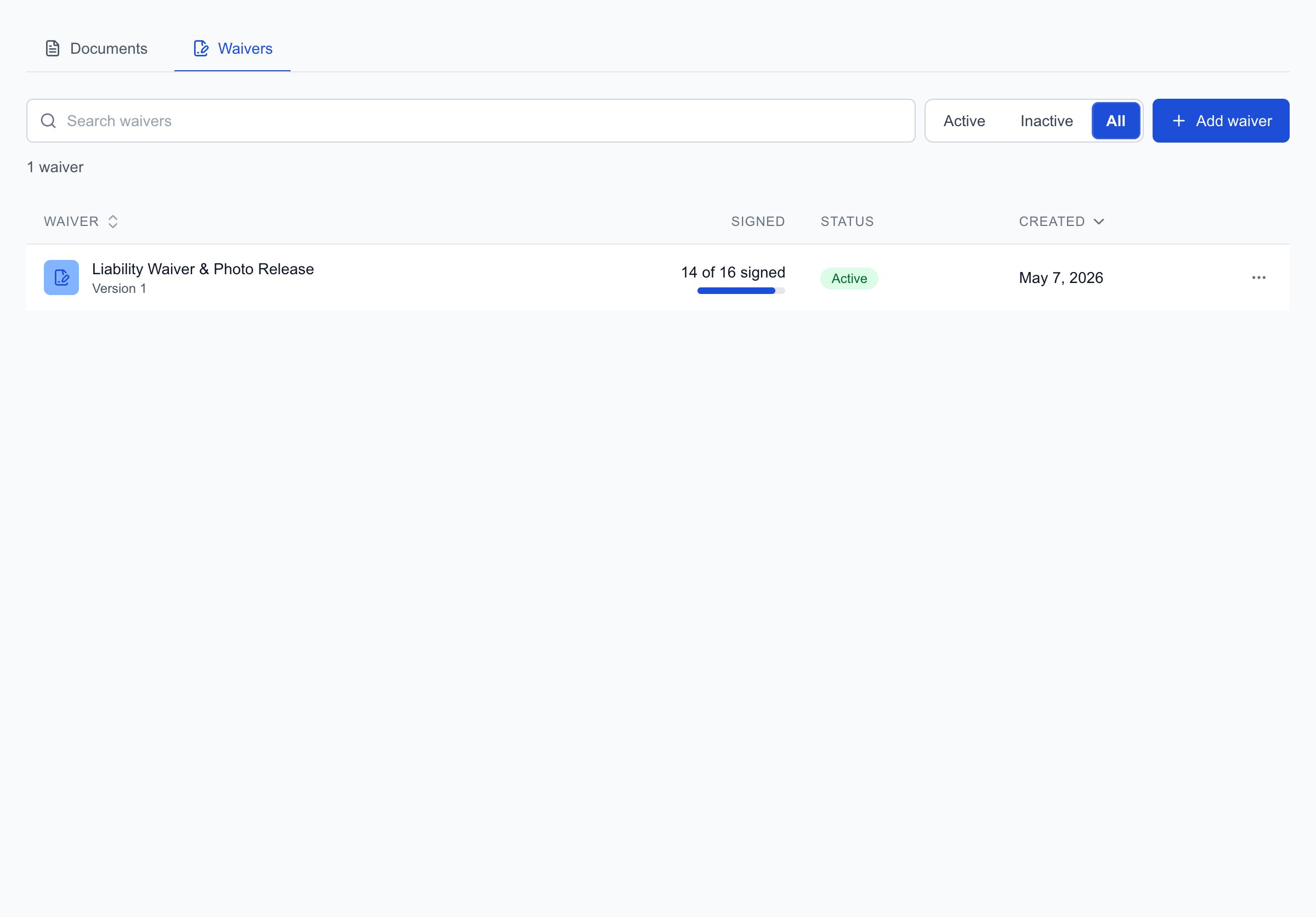
Click a waiver to open its panel:
- Overview shows its status, version, who needs to sign, how many families are asked, a signature progress bar and the waiver's text.
- Signatures lists every family it is for, signed or not. Filter by All, Not signed or Signed. A signed family shows when they signed. For a group or class waiver, each family shows which of their children it is for, and a family that hasn't signed shows what StudiFlo has told them:
- "Told Oct 7" — they got the notice by email and in the app.
- "Told in the app Oct 7 — their email is off" — they got it in the app only.
- "Will be told automatically" — the notice is on its way (see "When families are told" below).
- "Their notices are off — not told" — the family has turned off both the app and email notice for forms.
A family who has unsubscribed from email shows Unsubscribed next to their address.
Remind families to sign
- Everyone who hasn't signed: on the Signatures tab, press Send reminder to N parents. You can do this once every 24 hours for each waiver; until then the button says when you can try again.
- One family: press the mail button on their row (Send individual reminder). This works at any time.
- From a student: open the student on Students, choose the Sign-offs tab, and press Send reminder beside the waiver. One reminder per family per waiver every 24 hours.
- While enrolling: if a student can't be added to a class because of an unsigned waiver, the enroll window offers to remind the parent.
A reminder is an email. It goes only to families who haven't signed the current version.
Edit a waiver
Open the waiver and press Edit. What happens depends on what you change:
- The text (Content). StudiFlo warns you that the version will go up and that families must sign again. Press Confirm save to go ahead. Every family is then asked to sign the new version.
- The name, who needs to sign, or Active. No one who already signed is asked again.
Switch a waiver off, or delete it
- Switch it off: edit it and turn off Active. No one is asked to sign it or reminded about it, families can't sign it, and its signatures and figures stay on your screens. You can switch it back on later.
- Delete it: use Delete on its row or in its panel, then confirm. What happens depends on whether anyone has signed it:
- A waiver a family has signed (this version or an earlier one) is archived, not deleted, and you see "Waiver archived — its signatures are kept". It leaves your Waivers list and your other screens, no one is asked to sign it again, and it can't be edited, reminded or switched back on. Every signature is kept as a record, and each family that signed still finds it under Signed earlier on their Forms page.
- A waiver no one has signed is deleted for good, and you see "Waiver deleted".
If you may want the waiver back, switch it off instead of deleting it.
Other places you see sign-offs
- A student's Sign-offs tab lists the waivers that apply to that student (Signed, Not signed, or Needs re-sign) and the documents their family must read.
- The Dashboard's Sign-offs to collect card counts the parents with unsigned waivers or unread required documents, or says "You're all caught up."
How it works
Who needs to sign: the audience rule
StudiFlo never keeps a fixed list of who must sign. Each time it looks — on your screens, at enrollment, when it sends a notice — it works out the audience from your students as they are right now:
- Everyone. Every family owes it. On your screens, the waiver counts, lists and reminds the families with a child actively enrolled ("Active parents"). A family with no child enrolled right now still has to sign before their next enrollment.
- Groups. A family owes it while any of their children is in one of the picked groups. No enrollment is needed — a team between terms is still the team. An archived student doesn't count, unless they are still enrolled. An announcement to the same group reaches exactly the same families.
- Classes. A family owes it while any of their children is actively enrolled in one of the picked classes.
So the audience moves on its own. Add Mia to the Competition Team group and her family is asked to sign the team waiver; take her out and they no longer are. A group or class waiver with nothing picked, or whose groups and classes hold no one, is asked of no one — it never falls back to everyone. The waiver's row says why: "No one is in Competition Team yet, so no one is asked to sign this." or "Acro has ended, so no one is asked to sign this."
A family is told only which of their children a waiver is for ("It's for Emma."), never the name of the group.
One signature per family
A family signs once, and the signature covers all their children. A younger brother who joins the class later doesn't make the family sign again. A family that leaves keeps its signature, and it counts again if they come back.
A signature counts for the version that was signed. When you change a waiver's text, its version goes up and every family's signature becomes out of date: they show as Needs re-sign and are asked again. When they sign the new version, your screens show the new signature, and StudiFlo keeps the earlier one as a record — a signature is never overwritten.
Every version's words are kept
StudiFlo keeps the text of every version of a waiver. A family that signed an older version and isn't asked for the waiver now (say, their child left the group) sees, under Signed earlier, the words they actually signed — never today's text.
If your studio or a family's account is deleted
When a studio is deleted, or a family's account is, StudiFlo first keeps a copy of every waiver signature it held — the current one and any earlier ones: the words that were signed, who signed (name and email), when, and from what internet address, with the studio's and the waiver's names. Everything else is deleted as usual. The copies are kept for 7 years after the deletion and then deleted. No one at a studio or in a family can see them; the StudiFlo team looks one up only when asked, for example to show that a waiver was signed.
Waivers and enrollment
A waiver stands in the way only of what it is for:
| Who needs to sign | Family enrolling online | You enrolling a student |
|---|---|---|
| Everyone | Must sign first (it's part of checkout) | Can't enroll until the family has signed |
| Groups | Never blocked | Never blocked |
| Classes | Signs it at checkout for that class | Enrolls; the family is asked afterwards |
- An unsigned Everyone waiver holds every enrollment, yours included, because you can't sign for the family. The enroll window says the parent has unsigned waivers and offers to remind them.
- When you enroll a student in a class a class waiver is for, the student is enrolled and you see "The family will be asked to sign …".
- A family accepting a waitlist spot signs any waiver it needs first, in the same steps.
- A new family who signs up with your Parent sign-up link signs your Everyone waivers while setting up their account. While you have an active Everyone waiver, the sign-up page's What happens next list tells them they'll sign your forms; with none, it leaves that step out — setup skips it too.
When families are told
Group and class waivers tell families on their own. A family that newly owes one — a waiver you just made, a child added to the group, a new version of the text — gets one notice in the app and one email. StudiFlo checks every hour and tells families between 8 AM to 8 PM on your studio's clock, so no one is emailed in the night. It waits until 30 minutes after your last edit, so you can finish setting a waiver up before anyone hears. Just before it tells a family, it checks again — a family that signed or left the group a minute ago hears nothing. Each family is told once per version.
Everyone waivers are not announced automatically. Families meet them at the door: during account setup and before any enrollment. To ask families who are already enrolled, press Send reminder.
The automatic notice and your reminder are the same email. It asks the family to sign, says which children it is for (or, for an Everyone waiver, "Needed before Sofia can be enrolled in a new class."), and links straight to the waiver on the family's Forms page. A reply reaches your studio's contact email (Settings → Profile).
When you press Send reminder for everyone on a group or class waiver, families that were emailed about this version in the last 24 hours are left out, and the message after sending says how many.
Who doesn't get the email
A reminder or notice email skips a family that:
- has unsubscribed from all StudiFlo email,
- turned off the Forms waiting email in their own settings, or
- stopped waiver reminders from your studio with the link in an earlier email.
The family still sees the waiver on their Forms page, and still has to sign it before enrolling where it applies. A family with both the app and email notice for forms turned off isn't told at all — the Signatures tab says "Their notices are off — not told".
What families see
On the family's Forms page, waivers wait under To sign — the ones needed before enrolling first, with the line "Sign these before enrolling in a new class." To sign, the family opens the waiver, reads it, checks the box agreeing to its terms and signs. Signed waivers move to Signed and saved. A waiver they signed that isn't asked of them now (say, their child left the group, or you archived it) is listed under Signed earlier, with the words of the version they signed.
Groups and classes in use
You can't delete a student group or a class that a waiver is for. StudiFlo says which waiver uses it ("Team Waiver is for this group. Change who needs to sign that waiver first."). When you copy a term, a waiver for one of its classes is for that class's copy too, and no one who signed is asked again.
Common questions
Who has to sign a waiver?
Whoever you chose under Who needs to sign: every family, the families of students in the groups you picked, or the families of students enrolled in the classes you picked. StudiFlo works it out fresh each time from your current students, so it follows students into and out of groups and classes.
Why does an Everyone waiver show fewer families than I have?
On your screens an Everyone waiver counts the families with a child enrolled right now. Families with no current enrollment aren't listed or reminded, but they still have to sign before they enroll again.
Do families get a reminder automatically?
For group and class waivers, yes: one notice by email and in the app when they newly owe it, between 8 AM to 8 PM your time. Everyone waivers aren't announced — families sign them at account setup or before enrolling, and you can press Send reminder to ask families already enrolled.
I added a student to a group. When will the family hear about the group's waiver?
Within about an hour, during 8 AM to 8 PM on your studio's clock. The Signatures tab shows "Will be told automatically" until then, and "Told" with the date afterwards.
Why is the Send reminder button greyed out?
You can remind everyone about a waiver once every 24 hours; the button says how long until you can again. You can still remind one family at a time from their row. The button also doesn't appear while the waiver is switched off.
A family says they never got the email. Why?
They may have unsubscribed from StudiFlo email, turned off the Forms waiting email, or stopped waiver reminders from your studio. Their row shows Unsubscribed or "Their notices are off" when that's the case. The waiver is still on their Forms page.
Can I enroll a student whose family hasn't signed?
For an Everyone waiver, no — the enrollment waits until the family signs; remind them from the enroll window. For a class waiver, yes — the student is enrolled and the family is asked afterwards. Group waivers never hold an enrollment.
If I fix a typo in the waiver, does everyone have to sign again?
Yes. Any change to the text makes a new version, and every family is asked to sign it. StudiFlo warns you before you save. Changing only the name, who needs to sign, or switching it on or off doesn't ask anyone to sign again.
Does each child need their own signature?
No. One signature from the family covers all their children, including children who join later.
What happens to signatures if I delete a waiver?
They are kept. A waiver anyone has signed is archived instead of deleted: it leaves your screens and no one is asked to sign it, but every signature stays as a record, and the families who signed still see it under Signed earlier on their Forms page. Only a waiver no one has signed is deleted for good. To stop asking for a waiver but keep it on your screens, switch it off instead.
What happens to signatures if my studio or a family's account is deleted?
StudiFlo keeps a copy of each signature — the words signed, who signed, when and from what internet address — for 7 years after the deletion, then deletes it. Only the StudiFlo team can see these copies, and only looks one up on request — ask through Submit a ticket in your account menu.
Can I get an archived waiver back?
No. An archived waiver can't be edited or switched back on. If you need it again, create a new waiver with the same text — families sign the new one. To pause a waiver you may want back, switch it off instead of deleting it.
When a family re-signs, is their earlier signature lost?
No. Your screens show the newest signature, and StudiFlo keeps the earlier one as a record, along with the words of the version they signed.
Can I see what a family signed and when?
The Signatures tab shows the date and time each family signed. A family that signed an older version shows as needing to re-sign until they sign the current one.
Why does the waiver say no one is asked to sign?
It is for groups or classes, and right now none of its picked groups or classes has anyone in it — or nothing is picked, or its classes have ended, or the waiver is switched off. The row says which.
Why can't I delete a group or a class?
A waiver is for it. Open that waiver, change who needs to sign, then delete the group or class.
Where do families sign?
On their Forms page in StudiFlo. Every notice and reminder email links straight to the waiver there.
Where do replies to a waiver email go?
To your studio's contact email, set in Settings → Profile.
What is the difference between a waiver and a document?
A waiver is text families sign, and it can hold up enrollment. A document is a file you share; you can ask families to confirm they've read it, but it never holds up enrollment. Both appear on the family's Forms page. See the Documents article.
Can I see who changed a waiver or sent a reminder?
Yes. Adding or changing a waiver, deleting one and sending a waiver reminder are recorded in Recent activity on Staff & locations → People, with who did it — you, or an admin by name. Who signed, and when, is on the waiver itself.