
Using it
What's on the page
From top to bottom:
- A banner about your StudiFlo plan, while you're on a trial or if your subscription needs attention.
- Six tiles with this month's key figures.
- Revenue, last 6 months — a chart of money in.
- Today’s classes, and beside it Leads waiting (when you use leads) and Sign-offs to collect.
- Share your studio — your public links, join code and QR code.
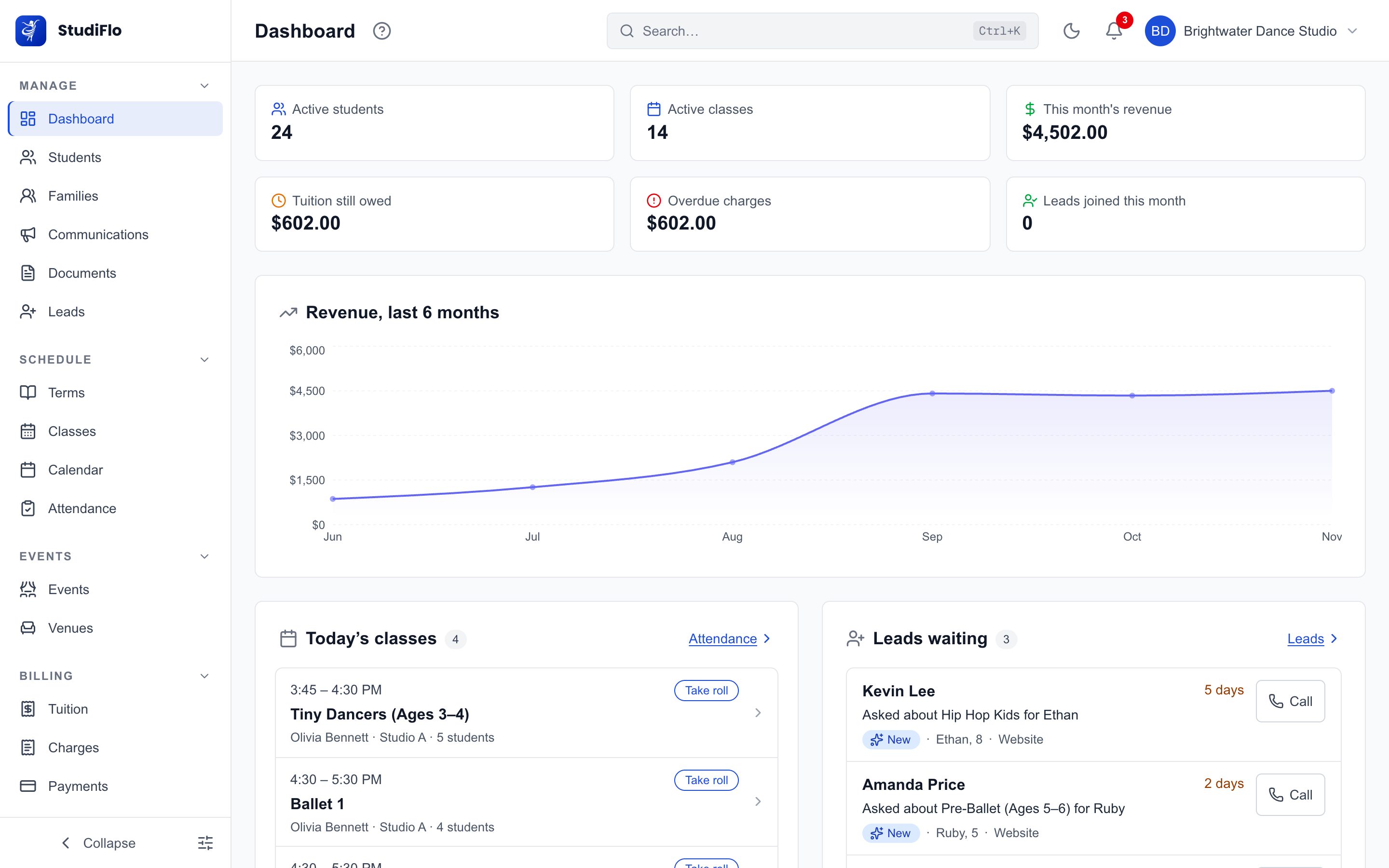
On a phone, the tiles sit in one row you can swipe sideways. When attendance is on and you have classes today, Today’s classes moves to the very top so you can take roll straight away, with Leads waiting next.
The six tiles
Click a tile to open the list behind it.
- Active students — students enrolled in at least one class right now (archived students aren't counted). Opens Students.
- Active classes — your active classes in a term that's running or coming up, or Year-round. Classes of a term that has finished or was cancelled aren't counted. Opens Classes.
- This month's revenue — money received this month, by card or recorded by you, minus refunds made this month. Opens Payments.
- Tuition still owed — what families still owe on tuition charges, for every month, including tuition posted but not due yet. Opens those charges on Charges.
- Overdue charges — the dollars still owed on charges of every kind whose due date has passed. Opens Charges with Overdue only on.
- Leads joined this month — leads who became families this month. Opens the joined leads on Leads.
"This month" is your studio's calendar month, in the time zone set in Settings → Profile. The figures refresh when you come back to the page.
Revenue, last 6 months
One point for each of the last six months, this month included. The last point is the same figure as This month's revenue. The chart rounds to whole dollars; the tile shows cents.
Today’s classes
Every class on today's schedule, earliest first, with cancelled classes listed after (marked Cancelled). The number beside the title counts cancelled classes too.
With attendance on, each class is a button: tap it to open that class's roll and mark it. Each row shows the time, the teacher and room (today's teacher — a class a substitute is covering reads "Substitute: Jordan Lee (for Amy Chen)"), who's on the roll ("15 students · 1 trial"), Now while the class is on, and where the roll stands — Take roll, "8 of 15 marked", Roll taken, or No students. If classes from the last two weeks still need roll, a line under the list says how many, with a link to Attendance.
With attendance off, the classes are listed without roll call, and the link at the top goes to Calendar.
My classes
If you teach classes yourself and have told StudiFlo which person in your list is you (Staff & locations → your own row → Access → I also teach), My classes lists today's classes you teach, each with Take roll (or where its roll stands) — it opens the same roll as Today’s classes — and My schedule for your week. With no classes of yours today it says so. If your own record has been made inactive, or no longer teaches classes, the card says that instead and how to fix it.
Leads waiting
This card shows up to three leads who are waiting on you — a trial they attended with no invitation sent yet, a new enquiry, an invitation that wasn't accepted, and so on — each with its one next step (Call, Resend, Send invitation, Rebook…). "+ N more" and Leads open Leads; Add lead adds one right here. When nobody is waiting it says "Nobody is waiting on you." The card appears once your studio has had a lead in the last 12 months.
Sign-offs to collect
How many families still have a waiver to sign or a required document to acknowledge ("unacked" means not yet acknowledged). Review opens Documents. When everyone's done it says "You're all caught up."
Share your studio
Each link has Copy and Open:
- Studio portal page — your public studio page.
- Parent sign-up link — where a new family signs up to your studio.
- Public classes page — your class listing.
- Ticket sales page — while you're selling tickets online.
- Trial booking page — while at least one class offers a free trial online.
The portal, classes, tickets and trial links need your studio's web address: set the Custom URL in Settings → Profile. The sign-up link works without one.
Below the links are your Join code (Copy, or Regenerate join code — the old code stops working at once) and a QR code of the sign-up link with Download QR code. When you offer free trials, a QR button switches it to the trial booking page.
The plan banner
For the last 14 days of StudiFlo's free trial, a banner says when it ends — "Your free trial ends November 29, 2026 — 3 days left." (counted on your studio's calendar), or "Your free trial ends today." — with Subscribe. Earlier in the trial there's no banner. It also tells you when your payment method failed (Update payment), and when your trial or your plan has ended — "Your trial has ended. New charges, classes, enrollments and online sign-ups are paused until you subscribe. Families can still pay what they owe." — with Subscribe. Every button opens Settings → Subscription.
How it works
Revenue: money that moved this month
This month's revenue counts money by the day it was paid and refunds by the day they were made. It's before processing fees, and it doesn't include ticket sales.
On October 3 a family pays $120 by card, and on October 10 another pays $80 in cash, which you record. On October 15 you refund $50 of a September payment. October's revenue is $120 + $80 − $50 = $150.
So a refund lowers the month you made it in, not the month the money came in, and a month with more refunds than payments can come out below zero. The same figure is Gross revenue on Reports for this month; Net revenue there is after processing fees.
Still owed and overdue
- Tuition still owed counts every tuition charge that's still owed — Unpaid, Part paid, Failed (a declined card) or Waiting on the bank — at what's left on it, whatever month it's for and whether or not it's due yet. It matches the Still owed tile on Charges filtered to tuition.
- Overdue charges counts owed charges of every kind — tuition, registration, one-time charges, late fees — whose due date was before today. A charge due today isn't overdue until tomorrow.
A charge can be overdue before any late fee or reminder goes out: those follow your own grace period and reminder days (see the Charges article).
Mia owes $90 of October tuition, due October 1. Today is October 18. It counts in both tiles: $90 in Tuition still owed and $90 in Overdue charges. Her November tuition, posted early and due November 1, counts only in Tuition still owed.
Active students
A student counts while they have at least one active enrollment and aren't archived. When a term finishes, its enrollments are completed, so students who aren't in a later term drop out of the count.
Common questions
Why is this month's revenue lower than I expected?
It counts only money paid this month, minus refunds made this month, before processing fees, and it leaves out ticket sales. A refund this month lowers it even if the payment was months ago.
Why is this month's revenue negative?
You refunded more this month than came in. Refunds count in the month they were made.
Why doesn't the Payments page show the same total?
The Payments list doesn't show a total. The matching total is Gross revenue for this month on Reports.
Why is "Tuition still owed" bigger than the Tuition page's figure?
The dashboard counts every month, including tuition posted but not due yet. The Tuition page shows one month at a time.
Is a charge due today overdue?
No. It becomes overdue the day after its due date.
Does "Active classes" match the Classes page?
Yes. The tile counts the same classes the Classes page shows under its default Current terms view: active classes in running or coming terms, plus Year-round classes. Classes of a finished or cancelled term drop out of the count.
Why does "Leads joined this month" open a longer list?
The tile counts this month's joins, but it opens every lead who has joined.
How do I take roll from the dashboard?
Turn attendance on in Settings → Attendance. Then tap a class under Today’s classes to open its roll.
Why don't I see My classes?
It shows only when you've told StudiFlo you also teach: Staff & locations → your own row → Access → I also teach.
Why don't I see the Leads waiting card?
It appears once your studio has had a lead in the last 12 months, or someone is waiting on you.
Why are some of my share links greyed out?
They need your studio's web address. Set the Custom URL in Settings → Profile. The ticket and trial links also only appear while you're selling tickets online or offering a free trial online.
What happens if I regenerate the join code?
The old code stops working immediately, so families who have it can't use it to join. Share the new one.
How do I hide the trial banner?
It shows only for the last 14 days of your trial, and it goes away once you subscribe — press Subscribe on it. It can't be dismissed, because it's about the end of your trial.
Why is my dashboard empty?
A new studio starts at zero. Add your classes and families, and the figures fill in as students enroll and pay.