
Using it
Read the Payments list
Each row is one movement of money, newest first. A $180 check that paid three charges is one row, not three. There are three kinds:
- Card payment — a family's card was charged. One card payment can pay several charges.
- Recorded payment — a payment you recorded yourself.
- Refund — money that went back to a family.
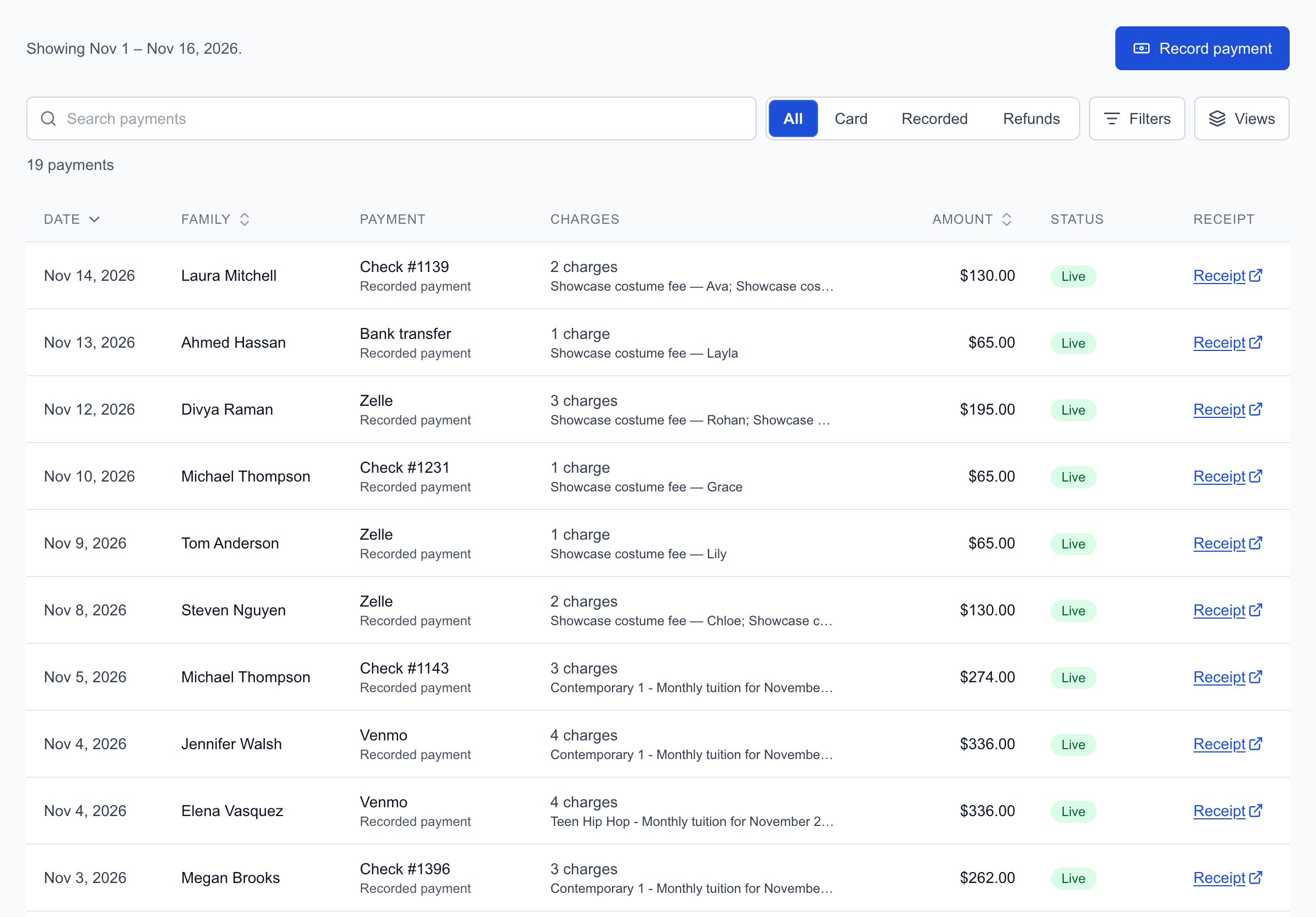
The columns show the date, the family, how they paid ("Check #1234", "Venmo", "Visa •••• 4242"), the charges it paid, the amount (refunds in red, as a minus) and its status. The Receipt column links the family's receipt.
- The All / Card / Recorded / Refunds switch shows one kind.
- Search payments finds a row by check number, family, charge or receipt number.
- Filters has Date (This month by default, on your studio's calendar — also Last month, Last 3 months, This year or your own dates) and Family.
- Clear filters, on the line under the bar, clears the search and Family and puts Date back to This month. The All / Card / Recorded / Refunds switch and the sort stay.
Search only looks inside the dates you've chosen, so widen Date to find an old check. A declined card isn't on this list (no money moved — see the charge itself), and neither is a refund that hasn't gone through yet.
Click a row to open the Payment panel: how it was paid, the day, any note or reference, the receipt, and each charge it paid. Click a charge to open it; Back returns you to the payment.
Record a payment made by cash, check or another way
Press Record payment on this page or on Charges (choose the family), or on a charge, a posting, a family's panel or a student's Billing tab.
- Choose the Payment method: Cash, Check, Venmo, Zelle, Cash App, PayPal, Bank transfer or Other. A check needs its Check number; Other needs a note saying what it was.
- Type the Amount received and the day it was Paid on (today by default; it can't be in the future or more than a year ago).
- Under Apply to charges, choose how it's shared across the family's open charges. Fill order is Oldest first by default (by due date), or Newest first, or Manual to type each amount yourself. No charge can take more than it still owes.
- Add a note if you like — the family sees this note.
- Press Record payment.
The family is emailed a receipt and gets a "Payment Received" notice. A payment can only go on charges that are Unpaid, Part paid or Failed — not on one that's Waiting on the bank or Disputed.
More than they owe? You can't record more than the family owes; StudiFlo doesn't hold account credit. Record what they owe and hand back or hold the rest.
Fix a recorded payment: Edit, Void or Reapply
Open the payment (from the Payments list or from the charge) and choose:
- Edit payment — correct the method, amount, check details, note or day. The original is kept, struck through, as history, and the family's receipt is replaced by a corrected one. No refund is recorded.
- Void — the money never arrived (a bounced check, a payment entered twice). The payment stays on record, struck through, and the charge is owed again with its original due date. Receipts already sent aren't recalled.
- Reapply — the money did arrive but went on the wrong charge. Move payment puts it on the right ones; the method, day and note stay as they were. If you move less than the whole payment, the rest is recorded as handed back to the family — a refund on their receipt — and that can't be undone. If the amount was only typed wrong, void it and record it again instead.
Each asks why (only your studio sees it) and has a Let the family know checkbox, on by default, that sends one notice in the app — no email, and never your reason.
A voided payment's charge isn't charged to the family's card automatically afterwards: use Charge card on the charge, or record the payment again when it arrives.
A voided payment or refund says who voided it and when — the person's name with their role, such as "Voided by Sam Lee · Admin on Nov 14, 2026". The family never sees that name.
Give a refund
Refunds are made one charge at a time. Open the charge and press Issue refund (or Issue refund on a card payment's line in the Payment panel). Then choose How is the money going back?
Refund to the card — the money goes back to the card that paid.
- Check the Amount to refund. It's filled in with the most you can send back; lower it for a part refund. The smallest card refund is $0.50.
- Pick a Reason for refund: Requested by the family, Duplicate charge or Fraudulent transaction. Choosing Fraudulent adds that card and email to Stripe's block list, which can't be undone.
- Press Issue refund.
You can refund to the card for up to 6 months after the card payment. In its last 30 days the refund window tells you the day it closes; after that, only Record a refund is offered.
Record a refund — you handed the money back yourself. Choose how (the same methods as recording a payment), the amount, the day, and a reason only your studio sees. The family is told the amount, the day and the method. Recording a refund on a charge paid by card does not send money back to the card — StudiFlo asks you to confirm you understand.
If a recorded refund was a mistake, open it and press Void refund. A refund that went back to a card can't be voided; to take the money again, post a new charge.
Disputes
When a family's bank opens a dispute (a chargeback) on a card payment, every charge that payment covered turns Disputed, a Disputed tile appears on Charges, and you get a "Payment Disputed" notice and an email with the amount, the family, the charge and the date your evidence is due.
While a charge is disputed you can't refund it, record a payment on it, or change its payments — the bank is holding that money.
To respond, use the email's Respond in Stripe Dashboard button, or Open Stripe dashboard on the Payouts page, and send your evidence there before the deadline. Useful evidence: the signed enrollment agreement or waiver, attendance records, emails or messages with the family, your refund and cancellation policy, and receipts. There's nothing to fill in inside StudiFlo.
How it works
Partial payments
A charge that's been paid in part is Part paid, and only what's left counts as Still owed.
Leo's $120 charge is Unpaid. His mom pays $50 in cash, and you record it. The charge is now Part paid: $120 − $50 = $70 still owed.
If the family is on auto-pay with a card on file, the $70 left is charged to their card on the due date, like any Unpaid charge — in one card payment with anything else of theirs due that day, the processing fee on what the card takes. If the card is declined, StudiFlo retries it like any declined charge. Otherwise collect it with Charge card on the charge, or record the next payment when it comes. What's left under $2.00 is never charged to a card: record it when the family pays. Once anything is paid on a charge, the charge can't be edited or cancelled (see the Charges article).
Refunds keep the processing fee
The processing fee on a card payment isn't given back when you refund. The refund window says so: "Processing fees are not returned."
A family paid $100 by card. You received $100 less the processing fee. You refund the full $100: the family gets $100 back, and your studio is out the processing fee.
Had you refunded $40 instead, the family gets $40 back, and you keep $60 of the payment, less the processing fee.
The refunded charge shows as Refunded, or Part refunded if only part went back. The money comes out of your Stripe balance and shows on your next payout (see the "Payouts and processing fees" article). The family's email says a card refund reaches them within 5 to 10 business days, depending on their bank.
A card refund is sent once and the family is told only when it has gone through. If no answer comes back straight away, the refund stays on its way and is checked again within the hour — don't issue it twice. If a refund fails (for example the card was closed), you get an "A refund failed" notice saying what happened to the charge and what to do next — usually, refund the family another way.
What a refund does to tuition and fees
- A refunded tuition month stays closed. It's never offered on the Tuition page again. If it's owed after all, post it with Add charges.
- A refunded registration fee isn't charged again for later classes that term.
- An Unlimited pass charge is refunded by ending the pass from the student's Billing tab, which returns its payment with it.
When a recorded refund takes a charge all the way down, the This closes the charge checkbox decides whether the charge is finished. It's on by default for one-time charges and registration fees and off for tuition. A charge left owing after a refund isn't charged to the card automatically — use Charge card on it.
Disputes, worked through
A disputed amount is taken from your Stripe balance as soon as the dispute opens, and held until the bank decides. StudiFlo pays the bank's dispute fee — your studio never does.
A family disputes a $100 card payment. You had received $100 less the processing fee. When the dispute opens, $100 is taken from your Stripe balance and held.
- You win: the $100 comes back to your balance, and the charges return to Paid.
- You lose: the $100 stays with the family's bank. The charges show as Refunded (or Part refunded), automatic retries stop on them, and the processing fee isn't returned — so, as with a refund, your studio is out that fee.
If you don't respond by the deadline, the dispute is lost automatically. A lost dispute on the charge that bought an Unlimited pass ends that pass, and the family is told.
Sometimes the bank only asks a question first (an inquiry). The charges show as Disputed meanwhile; if it closes without becoming a chargeback, no money is taken.
Payments taken at enrollment checkout — when a family paid at sign-up without a saved card — are answered by StudiFlo, not by you: nothing is taken from your payouts while the dispute is open, and StudiFlo contacts you if it needs evidence. If that dispute is lost, the amount is taken back from your payouts and recorded as refunded on the charge; if it's later won, it's paid back.
Where the processing fee shows
Open a charge paid by card: the panel shows Payment amount, the Processing fee and Your payout. They stay there after the charge is Part refunded, Refunded or Disputed, because the fee was taken and is kept. When one card payment paid several charges, it shows this charge's share and the one processing fee on the whole card payment. Payments you record by hand carry no fee.
Common questions
Why isn't a declined card payment on the Payments list?
No money moved, so it isn't a payment. You'll find it on the charge, which shows as Failed, and in the Failed tile on Charges.
Can I record more than a family owes, as credit?
No. StudiFlo doesn't hold account credit. Record what they owe and hand back or hold the rest.
A check bounced. What do I do?
Open the payment and press Void, with a reason. The charge is owed again with its original due date. If you'd like the family to know, leave Let the family know checked.
I recorded a payment on the wrong charge. How do I move it?
Open the payment and press Reapply, then Move payment to the right charges. If only the amount was wrong, void it and record it again instead.
Do I get the processing fee back when I refund?
No. The processing fee stays deducted, so a full refund costs your studio that fee — the refund window says "Processing fees are not returned." The fee on any payment shows when you open its charge (Processing fee).
How long does a card refund take to reach the family?
It's sent straight away; the family's bank usually shows it within 5 to 10 business days.
Can I refund to a card after a few months?
Up to 6 months after the card payment. After that, hand the money back yourself and use Record a refund.
I refunded a tuition month. Will it be billed again?
No. A refunded month stays closed. If it's owed after all, post it with Add charges.
Can I undo a refund?
A refund you recorded by hand can be voided with Void refund. A refund that went back to a card can't — post a new charge if the money is owed again.
Who pays the dispute fee?
StudiFlo. Your studio only loses the disputed amount if you lose the dispute — plus the processing fee, which is never returned.
How do I respond to a dispute?
In your Stripe dashboard: use the email's Respond in Stripe Dashboard button, or Open Stripe dashboard on the Payouts page. Send your evidence before the deadline in the email, or the dispute is lost automatically.
Why can't I refund or record a payment on a disputed charge?
The family's bank is holding that money until the dispute closes. Once it's decided, the charge is back to normal.
Can a family pay part of a charge?
Yes — record what they paid. The charge shows as Part paid and only the rest is still owed. If they're on auto-pay with a card on file, the rest is charged to their card on the due date; otherwise use Charge card or record the next payment.
Does the family see my note on a recorded payment?
Yes, the payment note is on their receipt. The reasons you give when you edit, void, reapply or refund are seen only by your studio.
Where's the total for the month?
The Payments page lists payments without a total. For this month's money in, see the dashboard, or choose This month under Range on Reports — the revenue tiles follow it.