
Using it
Add a venue
- Open Venues and press Add venue.
- Type the Venue name and answer Where is the stage? — Top of the plan (usual) or Bottom of the plan. This only sets which way the plan is drawn; you can change it later.
- Press Add venue. The venue opens, ready for its first section.
There's no address field when you create a venue. Add the address (and any notes) afterwards with Venue settings.
Draw the seating with sections
A section is a band of rows running across the house — the orchestra, the balcony. Sections stack front to back from the stage. Press Add section and fill in:
- Section name — for example "Orchestra". Each section in a venue needs its own name.
- Level — Floor (stage level), or a level above the floor (up to the sixth level). Sections on the same level are ordered by how close they are to the stage.
- Rows, and seats per row: The same in every row (type How many seats) or Different in each row (one number per row, starting at the row nearest the stage, such as 16, 16, 14, 14, 12).
- Row labels — Letters (A, B, C…) or Numbers (1, 2, 3…) — and whether row A (or row 1) is Nearest the stage or Furthest from the stage.
- First row is lettered (or numbered) — leave it blank to start at A or 1. Set it when this section continues another: a balcony above rows A–E starts at F.
- Skip these letters — filled in with I, O, Q, because they read as 1, 0 and O. Clear the box to use the whole alphabet. With numbered rows it's Skip these row numbers (for houses with no row 13).
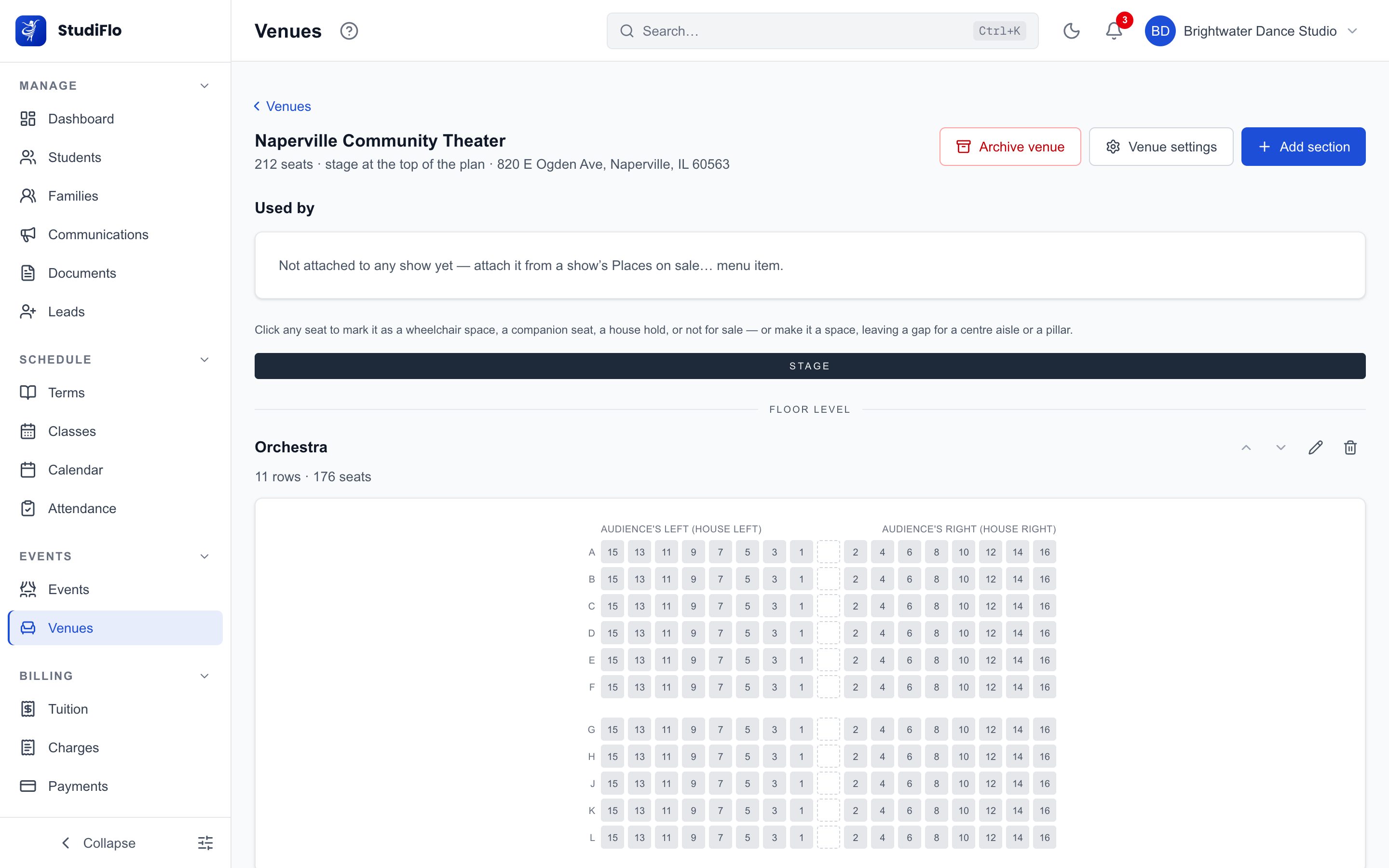
- Seat numbers — Straight through (1, 2, 3…) or Odds left, evens right, and Seat 1 is on the audience's left or right.
- Cross-aisles after rows — the row numbers, counted from the stage, that have a walkway behind them.
The preview on the right draws the section as you type and reads the front row back to you, for example "Row A, seats 1–12 left to right facing the stage (12 seats)". If one row is far bigger or smaller than the others, a warning asks "Is that right?" — it never stops you saving.
Use the arrows on a section's card to move it closer to or further from the stage.
Mark seats: wheelchair spaces, holds and aisles
Click (or tap) any seat on the plan to open it. Choose its Seat type — Standard, Wheelchair space, Companion seat, House hold or Obstructed view — and whether it's Available to sell. A house hold is never on sale. Press Save seat.
To make an aisle or leave room for a pillar, open the seat and choose Make this a space. A space takes up room in the row but has no number, so the seats after it are numbered straight on. Click a space to put a seat back (Make it a seat).
On a computer you can drag a box over many seats at once. The bar that appears sets their Type and On sale together (Apply to), or turns them into spaces (Make space) or back into seats (Make seats).
Venue settings and archiving
Venue settings changes the name, the Address, where the stage is, and Notes (parking, load-in, box office — anything worth remembering next season).
A venue can't be deleted, only archived. Archive venue takes it off the list and out of the choices for a show; its seating plan is kept, and Restore venue (from the Archived filter) brings it back. You can't archive a venue a show is still using — change those shows' seating first.
With no archived venue, Archived says "No venues in “Archived”". Clear filters, on the line under the bar, clears the search and leaves Active or Archived as you chose it.
The Used by part of the venue page, and the Used by column on the list, show which shows use the venue.
Use a venue for a show
On the Events page, open the recital or event, open the show's menu and choose Places on sale…:
- Venue: No seating plan (general admission) — type General admission places, the number of tickets the show can sell. Leave it blank to keep the show off sale.
- Venue: a hall — the show switches to reserved seating. Under Open for this show, check the sections you're selling; uncheck one to keep it closed (a matinee might not open the balcony). At least one section must stay open.
Press Save. The show's badge reads General admission, Seated, or Not on sale.
If you have no venues saved at all, there's no Venue choice: the window says "This show sells general admission" and shows General admission places straight away. Type the number and press Save — no hall is needed. For reserved seats, add your hall on Venues first, then come back and pick it.
How it works
Capacity is the seats you can sell
Every seat count — on the venue list, the venue page, each section and a show — counts only seats that are available to sell. House holds, seats you've taken off sale and spaces aren't counted.
The orchestra has 10 rows of 16 seats: 160 seats. You make two of them house holds for the sound desk. The section now shows 158 seats, and a show that opens only the orchestra can sell 158 tickets.
A show's reserved-seating capacity is the sellable seats in the sections it opens. A show that opens the orchestra (158) and the balcony (48) can sell 206.
Which way round the plan is drawn
With the stage at the top of the plan, the left of the drawing is the audience's left (house left). With the stage at the bottom, the plan is mirrored, so the drawing's right is the audience's left. The plan labels "Audience's left (house left)" and "Audience's right (house right)" for you, so you can check against the real hall.
How seats are numbered
- Straight through: 1, 2, 3… from seat 1's side across the row.
- Odds left, evens right: seat 1 sits next to the center. Odd numbers run out to house left and even numbers out to house right — for a row of nine: 9, 7, 5, 3, 1 | 2, 4, 6, 8. With an odd number of seats, the extra one goes on the left. If you also set Seat 1 is on the audience's right, the odds end up on the right — check the preview.
- Row letters skip the letters in your skip list and run on past Z as AA, AB and so on.
Changing a hall after tickets are sold
A seat with a ticket on it (sold or already scanned) is protected. Refunded or voided tickets free their seat.
- Always fine: renaming a section, changing its level or order, moving the stage, and renumbering. Renumbering keeps every seat in place, so tickets already sold follow the new row letters and seat numbers — the seat printed on an earlier ticket may change, so tell those buyers.
- Refused while seats in that part are sold: making a section smaller or changing its shape, deleting a section, or taking a sold seat off sale or making it a house hold. Refund or void those tickets first. You can still mark a sold seat as a wheelchair space, companion seat or obstructed view while it stays on sale.
- Changing a section's shape keeps the seats that are still there, removes the ones that go, and clears the seat markings in that section. You're told how many markings couldn't be kept, so you can mark them again.
Changing a show's seating after sales
- General admission to a seating plan: refused if general admission tickets have been sold (they have no seat on the plan). Refund them, or put the seating plan on a new show.
- One hall to another: refused while seats are sold in the current hall.
- Seating plan back to general admission: you're asked to confirm. General admission places shows the number the show had before you chose a hall, and the show goes back on sale for whatever number is in that box when you save.
- Closing a section: the show's capacity drops by that section's seats. It's refused while a sold ticket has a seat in that section — refund those tickets first, or leave the section open. It's also refused while a buyer checking out is holding seats there; wait a few minutes for the checkout to finish or run out. The message names the section and how many tickets or seats are in the way.
What buyers see
On the ticket page, a seated show shows a map with the stage, only the sections you opened, and a legend: Available, Your seat, Taken, and Held — may free up, plus wheelchair, companion and obstructed-view marks when the hall has them. Seats that aren't for sale look taken.
A seat a buyer picks is held for them for 10 minutes, renewed while they stay on the page. Once they go to payment, their seats are held until the payment finishes or runs out. If someone else takes a seat first, the buyer is asked to pick another. One order can hold up to 20 tickets.
The venue on the recital itself
A recital or event also has a Venue and Venue address — what families are told. Picking a saved hall there copies its name and address only; it doesn't attach the seating plan. For reserved seats, use Places on sale… on each show. If you leave the recital's venue blank, families see the venue of the first show.
Common questions
How do I make a center aisle?
Open the seat where the aisle goes and choose Make this a space, or drag over a column of seats and press Make space. Spaces have no number, so the seats beside them keep counting on.
Why does my venue show fewer seats than the hall has?
The count is seats you can sell. House holds, seats marked not available to sell, and spaces aren't counted.
Can I sell the balcony for one show and not another?
Yes. Each show picks which sections are open under Places on sale…. Closed sections don't appear on that show's ticket page. Decide before you sell: once a ticket for a balcony seat is sold, the balcony can't be closed for that show until you refund it.
Do I need a venue to sell general admission?
No. With no venues saved, Places on sale… asks only for General admission places. A venue is only for reserved seats.
Can I add the address when I create a venue?
Not on the first screen. Create the venue, then add the address in Venue settings.
How do I delete a venue?
Venues can't be deleted. Archive venue hides it from the list and from the show choices, and keeps its plan in case you need it again.
Why can't I archive a venue?
A show is still using it. The message names the shows. Change their seating under Places on sale… (or move them to another hall), then archive.
I sold tickets and then noticed a mistake in the seat numbers. Can I fix it?
Yes — renumbering is always allowed. The seats stay where they are and the tickets follow them, so a ticket for the third seat of the front row stays the third seat of the front row, with its new label. Let those buyers know their seat label changed.
Why won't StudiFlo let me remove a row?
Tickets are sold for seats in that row. Refund or void them first, or leave the row and take its unsold seats off sale.
What does "House hold" mean?
A seat the theater keeps back — for the sound desk, staff or a camera. It's never on sale and isn't counted in the capacity.
Can I charge more for some seats?
Prices come from the show's ticket types (Adult, Child and so on), not from the seat. Every seat in an open section sells at the ticket type the buyer picks.
How long is a seat held while someone is buying?
10 minutes while they choose, renewed while they're on the page, and then for the length of the payment once they check out. An unpaid hold runs out and the seat goes back on sale.
Can a show use two venues?
No. A show uses one hall, or none (general admission).
What does "Stage at the bottom of the plan" change?
Only how the plan is drawn: it's mirrored, so the audience's left is on the right of the drawing. Seat numbers don't change.
Can I see who changed a show's seating?
Changing a show's seating once tickets are sold is recorded in Recent activity on Staff & locations → People under Tickets, with who did it — you, or an admin by name. Setting up a venue or its seating chart isn't recorded.