
Using it
Create a promo code
Go to Settings → Promotions and press Add promo code:
- Code — what families type: letters, numbers, hyphens and underscores, 2 to 20 characters (the hint under the field says so). It's saved in capitals, and families can type it in any case. Each code is unique in your studio and can't be changed once created.
- Description (internal only) — a note for you. Families never see it.
- Discount type — Percentage or Fixed amount, and the Discount value (a percentage from 1 to 100, or a dollar amount).
- Applies to — what the code takes money off:
- Tuition only (the default) — the tuition paid at enrollment checkout, and tuition you post on the Tuition page.
- Registration fee only — the registration fee.
- Both — the registration fee and the tuition paid at checkout.
- Specific charges — only the charge codes you check. Only Tuition and Registration are listed, because those are the only charges a code can come off; your own charge codes and late fees aren't offered. An older code that still has one of your own charge codes checked saves normally: the window names the charge codes it will take off ("… will come off this code when you save — promo codes work on tuition and registration only") and keeps Tuition and Registration. If nothing else was checked, pick Tuition or Registration, or choose another Applies to.
- Usage limit — how many times the code can be used in total. Leave it blank for no limit.
- Per parent limit — how many times each family can use it. It starts at 1; clear the box for no limit (the hint under the field says blank means no limit).
- Expiry date (optional) — the last day the code works. It works through the end of that day, on your studio's calendar. There's no start date: a code works as soon as it's saved and switched on.
- Active — switch off to stop the code being used.
Press Save promo code.
Manage your codes
The list shows each code's Status — Live, Expired, Used up or Off — with its discount, what it applies to, its Usage (uses so far out of its limit) and its expiry. Search codes and the status filter help you find one.
Clear filters, on the line under the bar, clears the search; the status you chose stays.
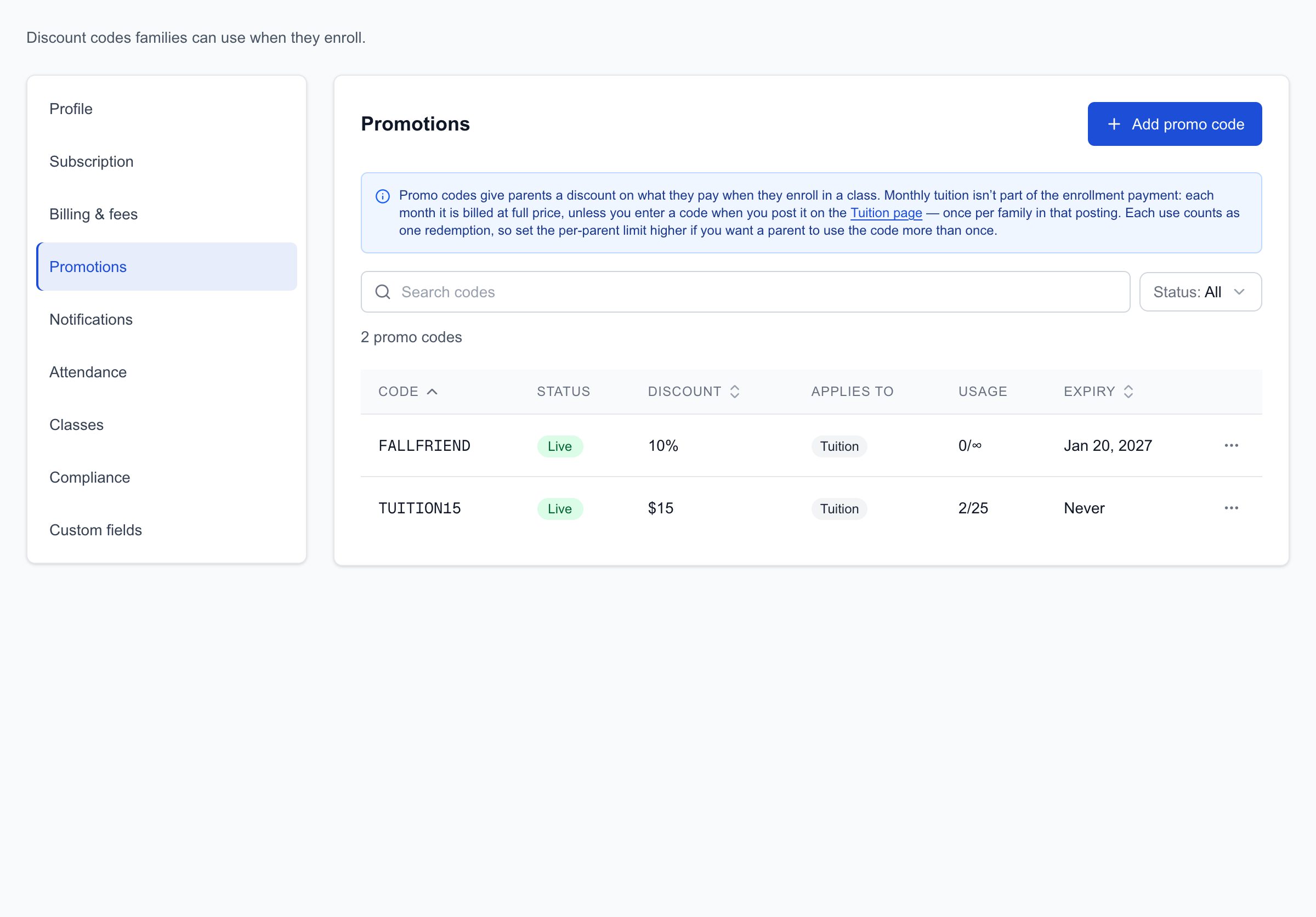
From a code's ⋯ menu: Edit, Turn off / Turn on, or Delete. You can change everything except the code itself after it's been used — apart from switching between percentage and fixed amount. A code that's been used can't be deleted; turn it off instead.
Use a promo code on tuition you post
On the Tuition page, in the window that opens when you press Post tuition, type the code and press Apply. The window shows the discount on each line before you post. See the Tuition article.
Set up the family discount
In Settings → Billing & fees → Family discounts, press Enable family discount. Each tier reads "Class [n] and up: [x] % off" — for example, class 2 and up 10% off, class 3 and up 20% off. Use Add tier for more (up to 10). A later class can never get a smaller discount than an earlier one. The preview shows what a family with $100 classes would pay. Press Save at the bottom of the tab.
Set up a sibling discount on registration fees
When you create or edit a term, under Registration, switch on Sibling discount and choose a Discount type — Percentage (%) or Fixed amount ($) — and a Discount value. It's taken off the term's registration fee for a family's second and later children.
Override discount when posting tuition
In the Tuition page's post window, Apply override discount takes your own discount off this posting, with an Audit note of at least 10 characters saying why. Choose Percentage off each class or Amount off each family’s total; a fixed amount can't be larger than the biggest family's total. A posting uses either a promo code or an override, not both.
How it works
Where a promo code can be used
- By a family, at enrollment checkout ("Have a promo code?"), for the one class they're enrolling in.
- By you, when you post tuition on the Tuition page.
That's all. A code can't be used on charges you add with Add charges, on a family's Pay page, when a family accepts a waitlist spot, or when you enroll a student yourself.
Promo codes at enrollment checkout
At checkout, a family pays the registration fee and, for per-term and one-day classes, the tuition. Monthly and per-class tuition isn't paid at checkout — it's billed month by month later. So:
- A Tuition only code can't be used when enrolling in a monthly or per-class class — the family is told the tuition is billed each month. Use the code when you post that tuition instead.
- A Both code at a monthly or per-class class comes off the registration fee only.
- A percentage comes off each line it applies to.
- A fixed amount comes off once — off the tuition first, and anything left off the registration fee.
A family enrolls in a per-term class: tuition $90, registration fee $30. They use a $25 Both code. Tuition: $90 − $25 = $65. Registration fee: $30. They pay $95.
A code is checked in this order: it exists, it's switched on, it hasn't expired, it has uses left, the family has uses left, and it applies to something in the checkout. A refused code uses nothing up. A family uses a code once per checkout.
Promo codes on tuition you post
- The family discount comes off first, then the promo code.
- A percentage comes off every line of each family.
- A fixed amount comes off each family once — from its first line, with anything left over coming off the next.
- Each family uses the code once per posting. A family past its per-parent limit, or reached after the code ran out of uses, is posted without it.
- Codes never apply to Unlimited pass lines or to a line you adjusted with Set amount.
Tiers: class 2 and up 10% off. Mia takes Ballet ($80) and Jazz ($100). You post October with a 10% code.
- Ballet, $80 — first class, full price, then 10% off: $80 − $8 = $72
- Jazz, $100 — second class: 10% family discount makes it $90, then 10% off: $90 − $9 = $81
A $25 fixed code. Leo's family's lines are $20 and then $90. The first line takes $20 and comes to $0, so it's posted as waived; the $5 left comes off the second line: $85. One use of the code.
The $2.00 minimum, and 100% codes
A discount can't bring a line below $2.00, the smallest card charge — a line that comes out lower is posted at $2.00. A line a discount takes all the way to $0 is posted as Waived: the family sees it with nothing to pay. A waived tuition month counts as billed and isn't offered again.
So a 100% code makes the lines it applies to free. At checkout with nothing left to pay, the family isn't charged anything.
When a use comes back
A code's use comes back when you cancel the charge it was used on, or edit that charge's amount (Edit charge warns you the discount will be removed). If the same family has another charge from the same checkout or posting still carrying the code, the use moves to that charge instead. Waiving or refunding a charge doesn't give the use back.
The family discount
The family discount is worked out over each family's whole month of monthly and per-class tuition, cheapest class first — the cheapest is full price, and each next class gets the tier for its place. Per-term and one-day classes, registration fees and Unlimited pass charges never get it. Tiers are percentages only. The Tuition article has the full rules and a worked example.
The sibling discount
A child gets the sibling discount on a term's registration fee when a brother or sister was already charged that term's fee.
The term's registration fee is $40, with a 25% sibling discount. Mia enrolls first and pays $40. Her brother Leo enrolls a week later: $40 − $10 = $30.
A fixed sibling discount can't be more than the fee. The $2.00 minimum applies, and a discount that takes the fee to $0 means no fee is charged. A promo code that applies to the registration fee comes off after the sibling discount.
The override discount
An override is for a one-off reduction on a whole posting — say, a month you've decided to charge everyone 20% less.
- A percentage comes off every line, after the family discount.
- A fixed amount comes off each family once — from its first line, with anything left over coming off the next, just like a fixed promo code.
Overrides never apply to Unlimited pass lines or to a line you adjusted, and the $2.00 minimum applies. The audit note is saved on every charge it changed. The post window's estimate works the override out the same way, so the total you see is the total that gets posted.
A $10 fixed override. Ava's family has two lines, $80 and $100. The first line becomes $70; the second stays $100. The family pays $10 less in all.
How discounts combine
- Promo code + family discount: yes — family discount first, then the code.
- Promo code + override: no — one or the other in a posting.
- Promo code + sibling discount: yes — sibling discount first, then the code on the fee.
- Anything + Unlimited pass lines: no — pass lines are always posted at their full price.
- Anything + a line you adjusted: no — the amount you typed wins.
Common questions
Where do families enter a promo code?
At enrollment checkout, under "Have a promo code?". There's no promo code box on their Pay page.
Why was a family told their tuition code can't be used?
They're enrolling in a monthly or per-class class, whose tuition isn't paid at checkout — it's billed each month. Use the code yourself when you post that tuition on the Tuition page, or make a Registration fee only or Both code for checkout.
Can I put a promo code on a charge I add with Add charges?
No. Promo codes work at enrollment checkout and on tuition you post from the Tuition page. To bill a family less on a one-time charge, type the lower amount.
Can a family use the same code twice?
Only if the Per parent limit allows it. It starts at 1; raise it, or clear it for no limit.
Does a code expire at midnight?
It works through the whole of its expiry day, on your studio's calendar, and stops the next day.
Can I schedule a code to start later?
No — there's no start date. Create it switched off, and turn it on when you're ready.
Why can't I delete a promo code?
It's been used. Turn it off instead, and it can't be used again.
Can a promo code take money off late fees or other charges?
No. A code only comes off tuition and registration fees — that's why Specific charges lists only Tuition and Registration.
Does a promo code come off before or after the family discount?
After. The family discount comes off first.
Can I use a promo code and an override discount together?
No. A posting uses one or the other. Applying a code removes the override, and opening the override asks you to remove the code.
Does a fixed promo code come off every line?
No. It comes off each family once — from its first line, with any rest coming off the next.
Can the family discount be a fixed amount?
No, tiers are percentages only.
I cancelled a charge that used a promo code. Does the family get the use back?
Yes, unless another charge from the same checkout or posting still carries the code. Waiving or refunding doesn't give it back.
What does a 100% code do?
It makes the lines it applies to free: they're posted as Waived, and nothing is charged.
Why didn't a discount bring a line below $2.00?
$2.00 is the smallest amount a card can be charged. A discount can bring a line down to $2.00, or all the way to $0 (waived), but not in between.
Can I see who made or changed a promo code?
Yes. Making, changing and deleting a promo code are recorded in Recent activity on Staff & locations → People under Prices and codes, with who did it — you, or an admin by name. A deleted code's line keeps its name. A change to the family discount is recorded as a change to billing settings.